Construction estimating software built for Canadian quoting
Turn a short project brief into an itemized, tax-ready estimate in seconds with Bridge AI — then fine-tune the line items, markup, and margin by hand. Every estimate is country-aware, so GST/HST/PST in Canada and state sales tax in the US are built in.
The problem
A detailed estimate can take hours of copying line items from the last similar job and re-checking the math. Slow quotes lose deals, and a single markup or tax error quietly eats the margin on a whole project.
How BuildersBridge solves it
AI-generated estimates
Describe the job in a sentence and Bridge AI drafts an itemized estimate — labour, materials, and subs — that you review and adjust before sending.
You review and approve every line
The AI draft is a starting point you verify and edit — quantities, unit costs, line items, markup and discount — before the estimate goes out. AI writes the first version; the builder approves what the client sees.
Consistent math
Cost, markup, discount, tax, and margin are calculated in one place — the numbers reconcile.
Country-aware tax
GST/HST/PST for every Canadian province, and the statewide sales tax rate for US states, applied from the job's location. Where a local rate applies on top, you can set it as an override.
Estimate to project budget
An approved estimate sets the contract value the job bills against, and seeds the project's cost budget when none was already set — no double entry between sales and delivery.
Quotes & proposals, same workflow
Send the estimate as a client-ready quote or a versioned proposal for portal approval — quote software and estimating software are one tool here, not two.
Worked example: from a one-line brief to an approved estimate
A fictional ensuite renovation in Edmonton. The rates are made up to show the arithmetic; the totals are calculated by the same pricing and tax code the app runs.
- Write the briefYou do this
“Ensuite renovation: retile shower and floor, new vanity, toilet and fixtures, repaint.”
- Bridge AI drafts the linesBridge AI drafts
Labour, material, subcontract and equipment lines with quantities and unit costs, as a draft you can change.
- You correct the draftYou do this
The draft had 45 sq ft of tile; you measured 52 and add waste. You set the fixture allowance at $2,800 and the markup at 18%.
- Send it for approvalWorks today
The estimate goes to the client’s portal or out as a PDF. Nothing is sent until you send it.
- Approval sets up the jobWorks today
The approved pre-tax total becomes the contract value, and the cost becomes the job budget if no budget was set.
| Line | Type | Qty | Unit cost | Cost |
|---|---|---|---|---|
| Demolition and disposal | Labour | 16 h | $75.00 | $1,200.00 |
| Tile installation, shower and floor | Labour | 52 sq ft | $18.00 | $936.00 |
| Plumbing fixture swap (licensed sub) | Subcontract | 1 lot | $2,400.00 | $2,400.00 |
| Paint walls and ceiling | Labour | 10 h | $65.00 | $650.00 |
| Porcelain tile, 52 sq ft + waste | Material | 58 sq ft | $9.50 | $551.00 |
| Membrane, setting materials, grout | Material | 1 lot | $420.00 | $420.00 |
| Vanity, toilet and fixtures (allowance) | Material | 1 allowance | $2,800.00 | $2,800.00 |
| Disposal bin | Equipment | 1 ea | $450.00 | $450.00 |
| Item | Amount |
|---|---|
| Cost (your budget) | $9,407.00 |
| Markup 18% | $1,693.26 |
| Pre-tax price (contract value on approval) | $11,100.26 |
| GST 5% (Alberta) | $555.01 |
| Total to the client | $11,655.27 |
Markup is applied to cost, so 18% markup on $9,407.00 is a 15.3% margin on the price. The approved $11,100.26 is what the job bills against; $9,407.00 is what it is budgeted to cost.
What it does today, and what it does not
- Bridge AI draftsBridge AI writes the first draft of the lines from your description. It is a draft for you to check, never a quote sent on its own.
- You do thisYou confirm quantities, unit costs, exclusions and markup, and you decide when it is sent.
- Works todayMarkup, discount and GST/HST/PST or state sales tax are calculated in one place; approval sets the contract value and, if none exists, the budget.
- Not yet builtNo takeoff from drawings and no built-in price database: quantities are typed or counted by you, and unit costs are yours or your suppliers’.
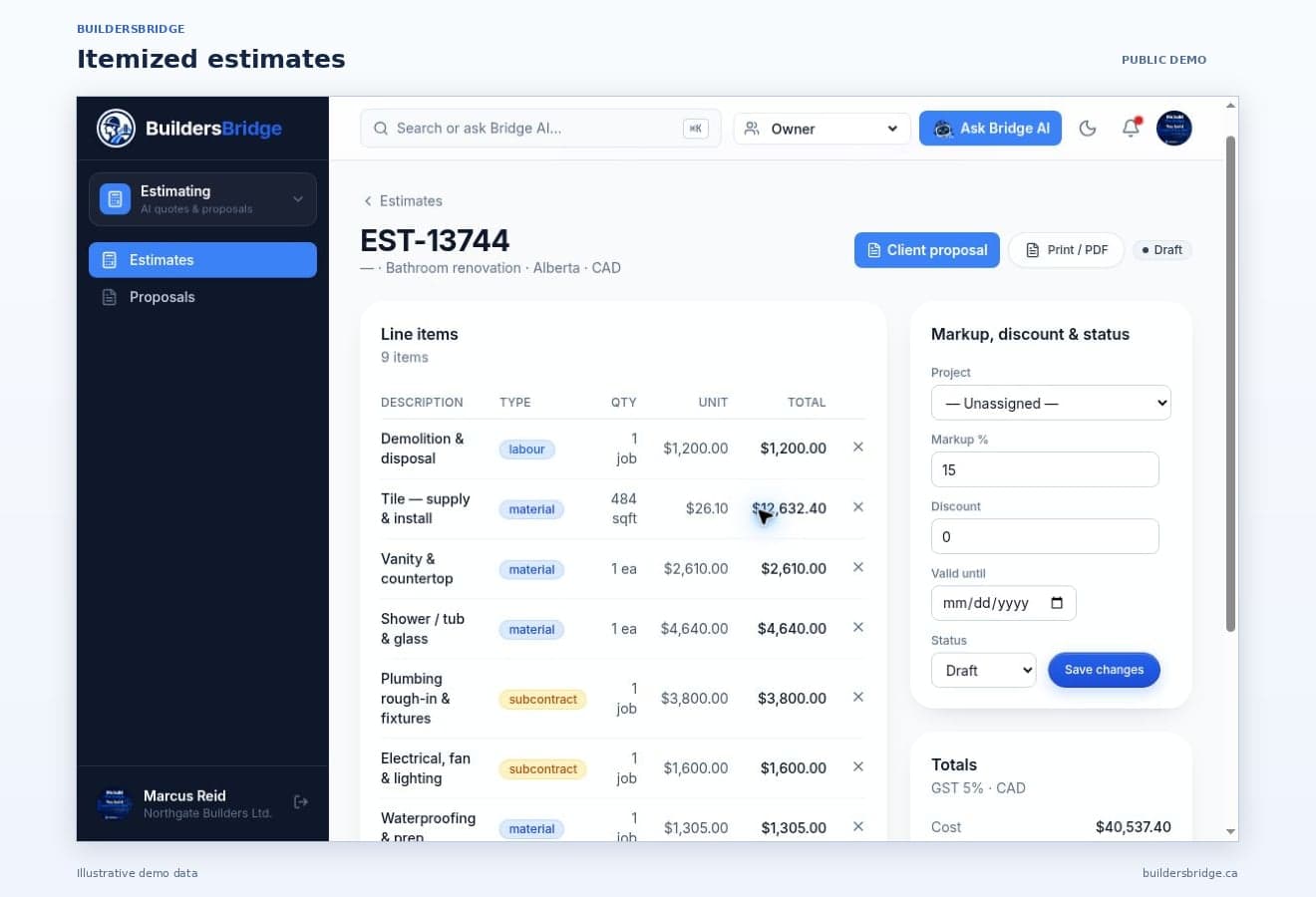
What this looks like in the product
Frequently asked questions
- How does AI estimating work?
- You write a short brief — for example, a bathroom renovation with a given scope — and Bridge AI produces an itemized estimate with labour, materials, and subcontractor lines. You review, edit quantities and costs, and set your markup before sending.
- What should I review before sending an AI estimate?
- Check measured quantities against the actual site or plans, verify current supplier and trade quotes match the AI's unit costs, confirm exclusions are listed, and review your markup and the applied tax for the job's province or state. The AI draft saves time on the layout; the builder validates the numbers.
- Can I edit the AI estimate?
- Always. The AI draft is a starting point — every line item, quantity, unit cost, markup, and discount is fully editable before the quote goes out.
- Does Bridge AI send estimates to clients on its own?
- No. Bridge AI writes a draft inside your workspace. Nothing reaches the client until someone on your team sends it, and the client then approves it in the portal. A draft is never a binding quote.
- Does it include a cost database or takeoff from drawings?
- No to both, today. There is no built-in materials price database: unit costs are yours or your suppliers', and Bridge AI's suggested costs are a starting point to check. Takeoff from drawings is on the roadmap; quantities are measured or counted by you.
- Does an approved estimate become the project budget?
- An approved estimate sets the contract value the job bills against, and seeds the project's internal cost budget when none was already set. The contract value is what the client agreed to pay; the cost budget is the builder's internal number for tracking spend.
- Is this also construction quote software?
- Yes — quotes and proposals are the same workflow. The estimate you build is the quote you send: as a PDF, or as a proposal the client approves in their portal, with every version recorded.
- Does it handle Canadian taxes on estimates?
- BuildersBridge applies GST/HST/PST by province based on the job's location, so an Alberta quote shows 5% GST and an Ontario quote shows 13% HST without manual lookups. (BuildersBridge is software, not tax advice.)
- What should construction estimating software actually do?
- Produce an itemized estimate with labour, materials and subcontract lines; apply markup and tax for the job's province or state; let you edit every line before it goes out; send it as something the client can approve; and carry the approved contract value through to the project. An estimator that stops at a PDF leaves the costing work still to do.
- How much does construction estimating software cost?
- It varies from a few hundred dollars a year for a single-user estimator to enterprise platforms priced per seat. BuildersBridge publishes its plans rather than quoting privately, and estimating is included in every plan rather than sold as an add-on — see the pricing page for current figures.
- Is construction estimating software better than a spreadsheet?
- A spreadsheet is fine until the maths breaks quietly. The differences that matter are tax applied by region without lookups, markup calculated in one place, a version history when a client disputes what was quoted, and the approved contract value flowing through to the project instead of being retyped.
- Can AI write a construction estimate?
- It can write the first draft. Bridge AI turns a short project brief into itemized labour, material and subcontract lines in seconds, which is the slow part. The builder then reviews quantities, unit costs and markup and decides what goes out — the draft is a starting point, never a binding quote.
- Does it handle invoicing as well as estimating?
- Yes, and they are the same project record rather than two systems. An approved estimate sets the contract, and deposit, progress and final invoices are raised against that job with GST/HST/PST applied by the same regional rules the estimate used — with holdback kept visible until it is released.
- Is there a free Excel construction estimating template?
- Yes, and it is genuinely free — a direct .xlsx download with no email gate and no sign-up, in free templates. It has itemized labour, material and subcontract lines and a provincial tax lookup. A spreadsheet is the right tool right up until the point the maths breaks quietly: no version history when a client disputes what was quoted, and the approved number has to be retyped into a project rather than becoming one.
- Is there construction estimating software for small contractors?
- This is one. The Team plan is $499/month for up to 15 users with the full estimate builder included, not gated behind a higher tier, and there are no per-seat fees on any plan. A one-person renovation business gets the same itemized estimating, regional tax handling and approved-estimate-to-project flow that a fifty-person builder gets.
- Does it work for general contractors who subcontract most of the work?
- Yes. Subcontract is a line type alongside labour, material and equipment, so a GC can price a job mostly out of trade quotes and still see the breakdown. Once the estimate is approved it sets the contract and seeds the cost budget, and purchase orders raised against that job show as committed cost before any bill arrives.
- Is this residential estimating software or is it built for commercial work?
- Residential. It is built for home builders, renovators and the trades working on houses — custom builds, additions, kitchens, bathrooms, roofing, mechanical. There is no takeoff from drawings and no RFI or submittal workflow, so a commercial GC bidding institutional work would find it thin.
- Is it cloud based, and can I quote from the jobsite?
- Yes — it runs in the browser with nothing to install, and it is a progressive web app, so you can add it to a phone home screen and build or edit an estimate from site. Estimates you change sync to the same workspace your office sees.
See construction estimating software done right
Start a 14-day free trial — no sales call required — or take a guided tour. No charge until your trial ends.